
Adding a project code
You can add a code in either of two ways:
Open the project and go to the Project Info screen.
Hover over the Project Info icon and select the option to add a code.
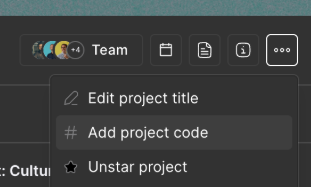
Alternatively:
Open the project.
Select the three-dot menu in the project navigation.
Choose Add project code.
Enter the code and save your changes.
Where will the project code appear?
Once added, the code will be visible in:
Project cards
The Project Overview screen
The Project Info screen and overlay
My Tasks