Outlign gives you a few different theme options so you can work the way that feels best for you.
To access your theme settings:
Click your avatar in the bottom left-hand corner
Click Theme
Choose your preferred display mode
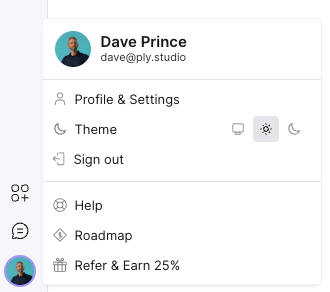
The sun icon enables Light Mode.
This keeps the interface bright and clean for daytime use.
The computer/screen icon enables Dark Mode.
Perfect for lower-light environments or anyone who prefers a darker interface while working.
The moon icon enables Automatic Mode.
This will automatically switch between Light and Dark Mode depending on your device or timezone settings.
A nice little set-and-forget option if you move between day and night work sessions.